You choose which methods to offer under Payment methods in the Blink settings. Google Pay needs no extra setup, Apple Pay needs a one-off domain registration, and every method must first be enabled on your Blink account.
Method | What you need to do | Learn more |
|---|---|---|
Card | Add your API keys. 3D Secure is handled by Blink. | |
Google Pay | Tick it in Payment methods. No other setup. | |
Apple Pay | Register your domain (steps below), then tick Apple Pay Enabled. | |
Open Banking | Tick it in Payment methods. Must be enabled on your Blink account. | |
Direct Debit | Tick it in Payment methods. Must be enabled on your Blink account. |
If a method is ticked but doesn't show at checkout, it is usually not yet enabled on your Blink account. Contact integrationsupport@blinkpayment.co.uk to check.
Card payments
With Direct integration, customers enter their card details in secure Blink fields inside your checkout. With Hosted integration, they are sent to a unique Blink payment page and returned to your store afterwards. You choose under Integration Type in the settings. 3D Secure runs automatically, and if a payment is declined the customer sees the reason and can try again. If pre-authorisation is on, card is the only method offered.
Set up Apple Pay
Apple needs to confirm that you own your domain before Apple Pay can appear. Do this once per store domain.
In the Blink settings, under Apple Pay, click Download domain verification file.
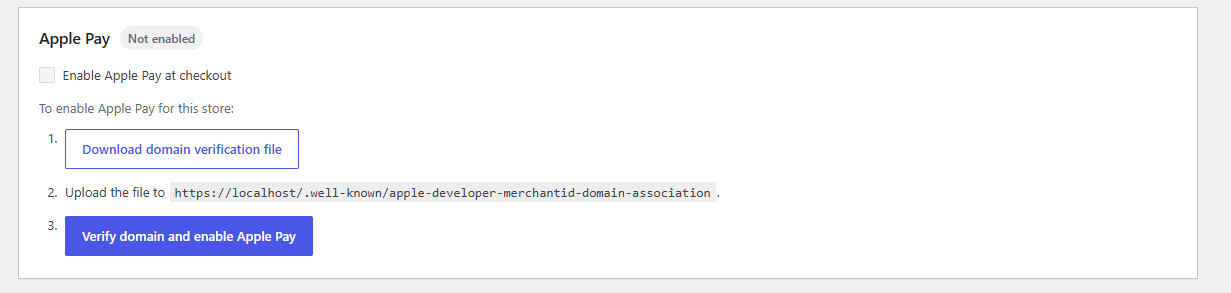
Upload the file to your web server at the address shown in the settings. It looks like
https://your-store.com/.well-known/apple-developer-merchantid-domain-association, with no file extension.Click Verify domain and enable Apple Pay. Blink checks the file is in the right place and registers your site with Apple Pay.
Check Apple Pay enabled shows as enabled.
Click Save changes.
Apple Pay follows Apple's own rules for where it can run. On Apple devices it works as usual. On Windows and other desktop browsers, such as Chrome, Edge or Firefox, Apple Pay shows a code that the customer scans with an iPhone running a recent version of iOS, then completes the payment on the iPhone. Without an iPhone it isn't available on Windows. Test first on an iPhone or iPad.
If Apple Pay does not show
Open the file's address in a browser. It should display text, not a 404 or a login page.
Check your server or security plugin isn't blocking the
.well-knownfolder.Check Apple Pay is enabled on your Blink account.
Check Apple Pay enabled is switched on in the Blink settings, and that you are using a device Blink supports.
Developer-level detail on registering domains is in the Apple Pay API guide.